A personal blog did not need this much architecture
A personal site does not need three applications, PostgreSQL, object storage, and a custom deployment pipeline. So why did I build one that way? Because I can.
The goal was not to prove that Kotlin is the simplest tool for a blog. It was to explore using Kotlin in different ways across the web stack and find out whether it could cover the entire publishing path: from a browser-based editor, through an authenticated backend, to static pages at the edge, without making readers depend on a permanently running application. The finished system uses Kotlin in three different forms: JVM on the server, JavaScript for the public site, and WebAssembly for the writing studio. The most important decision, however, was not treating those three surfaces as the same kind of application.
The experiment: Kotlin from editor to reader
I wanted to explore more than whether Kotlin could render a web page. That part was already easy enough to answer.
I wanted to know what it would be like to use Kotlin for the whole lifecycle of an article:
- Writing and previewing it in a browser
- Saving it through an authenticated API
- Storing it in a database
- Turning it into a complete static website
- Publishing that site
- Reporting whether the deployment actually succeeded
This was never meant to be the shortest route to putting words on the internet. A hosted CMS and an existing static-site generator would have solved the practical problem much faster.
The project was useful precisely because I chose to own more of the problem. It gave me reasons to work with Kotlin/JVM, Kotlin/JS, and Kotlin/Wasm in a single system, while dealing with the boundaries between them rather than hiding them behind a toy example.
The constraints that shaped the system
I had a few requirements before settling on the final architecture. The public site should not need the backend to serve a page. If the API or database is temporarily unavailable, an already-published article should remain readable. The writing experience could be dynamic. Editing posts, uploading images, managing tags, and watching deployments all benefit from application state and immediate feedback.
Preview should resemble the published article closely enough that I could trust it. I did not want one Markdown implementation in the editor and another in production. Publishing also needed to describe what was really happening. Saving a post, requesting a deployment, and having that deployment succeed are three distinct events. The interface should not collapse all three into a green "Published" message. Those constraints led to a system with a static public half and a dynamic private half.
One language, three runtimes
The site consists of three applications. The public website uses Kobweb and targets JavaScript. It contains the homepage, about page, writing index, and each published article. The backend is a Ktor app. It handles posts, login, Markdown rendering, uploads, previews, and the publishing flow. The content itself lives in PostgreSQL. I use Exposed to talk to it and plain SQL migrations to change the schema.
The private writing studio is built with Compose Multiplatform targeting WebAssembly. It handles post editing, tags, media, settings, previewing, and deployment status.
Some data contracts are shared across applications, which is one of the pleasant aspects of using Kotlin across the stack. A post or deployment model does not need to be independently redefined in three languages. That does not make the runtimes interchangeable, though. Browser file uploads still require browser APIs. A Compose/Wasm interface behaves differently from a Kobweb page. The JVM backend has responsibilities that should never be moved into either frontend.
Using one language reduced some friction. It did not remove the platform boundaries, and I think the architecture is better because I don't expect it to do so.
The final architecture
The finished system looks roughly like this:
┌──────────────────────────────┐
│ Compose/Wasm writing studio  │
│ Edit · Preview · Deploy      │
└──────────────┬───────────────┘
               │ authenticated requests
               ▼
┌───────────────────────────────┐
│ Ktor API running on the JVM   │
│                               │
│ Auth · Content · Markdown     │
│ Uploads · Preview · Deployment│
└───────┬───────────┬───────────┘
        │           │
        ▼           ▼
┌──────────────┐  ┌──────────────┐
│ PostgreSQL   │  │ Cloudflare R2│
│              │  │              │
│ Content and  │  │ Uploaded     │
│ deployments  │  │ media        │
└───────┬──────┘  └──────────────┘
        │
        │ signed deployment event
        ▼
┌──────────────────────────────┐
│ GitHub Actions               │
│                              │
│ Fetch public snapshot        │
│ Build and verify site        │
│ Deploy and report status     │
└──────────────┬───────────────┘
               │ Kobweb static export
               ▼
┌──────────────────────────────┐
│ Cloudflare Pages             │
│                              │
│ HTML · RSS · Sitemap         │
└──────────────┬───────────────┘
               ▼
            Readers
The important boundary is near the bottom. Readers receive a statically generated website from Cloudflare Pages. They do not need a request to the Ktor service or PostgreSQL to read an article. The backend can be unavailable, and the already-published public site will continue to work. I would lose the ability to edit or publish until it recovered, but I would not lose the site itself.
Why the reader-facing site is static
A personal site is mostly content. Once an article has been published, it rarely needs to be assembled again for every visitor. The first version of the public site fetched content from Ktor in the browser. That worked locally, but it tied every reader to the backend's availability and response time. It also meant the initial document did not contain the full article.
The current version moves that work into the release build. Every published route becomes a complete HTML document containing its content and metadata. The same build produces the RSS feed, sitemap, robots policy, canonical URLs and social metadata.
Kobweb still produces a JavaScript application, but the article itself does not rely on a runtime content request. Search engines, feed readers and people browsing without JavaScript can all receive the published content directly.
This was not about making the entire system static. It was about placing the static boundary where it offers the most value.
From PostgreSQL snapshot to complete HTML
The public snapshot became the centre of the publishing system. Ktor exposes a versioned snapshot containing the public settings, published posts, tags, referenced media, and rendered article HTML. The data is collected as a single, consistent database read rather than as a collection of unrelated requests made while the site is being built.
During a release, the public build fetches that snapshot and validates it before generating anything. It then uses the snapshot to generate Kotlin sources for the public pages and resources for RSS, the sitemap, and robots.txt.
Once Kobweb has exported the site, I run one more check over what it produced. This check ensures that every expected route is present, the metadata lines up, internal links are intact, and none of the placeholder content or runtime API references from development slip into the final build.
And if the snapshot is missing, malformed or incomplete, the build fails. It does not deploy an empty writing index or half of the published articles. That behaviour matters more to me than making the pipeline appear simple. If a deployment succeeds, it should be because the public output was complete enough to publish.
Building a writing studio in Compose/Wasm
The private side of the site has very different needs from the public side, which made it a better fit for Compose Multiplatform.
The studio is where I create and edit posts, manage tags, upload images, update site settings, and explicitly deploy the latest saved content.. It also needs to communicate less-obvious states: whether an editor contains unsaved changes, whether a request failed, whether a session expired, and whether a deployment is still running.
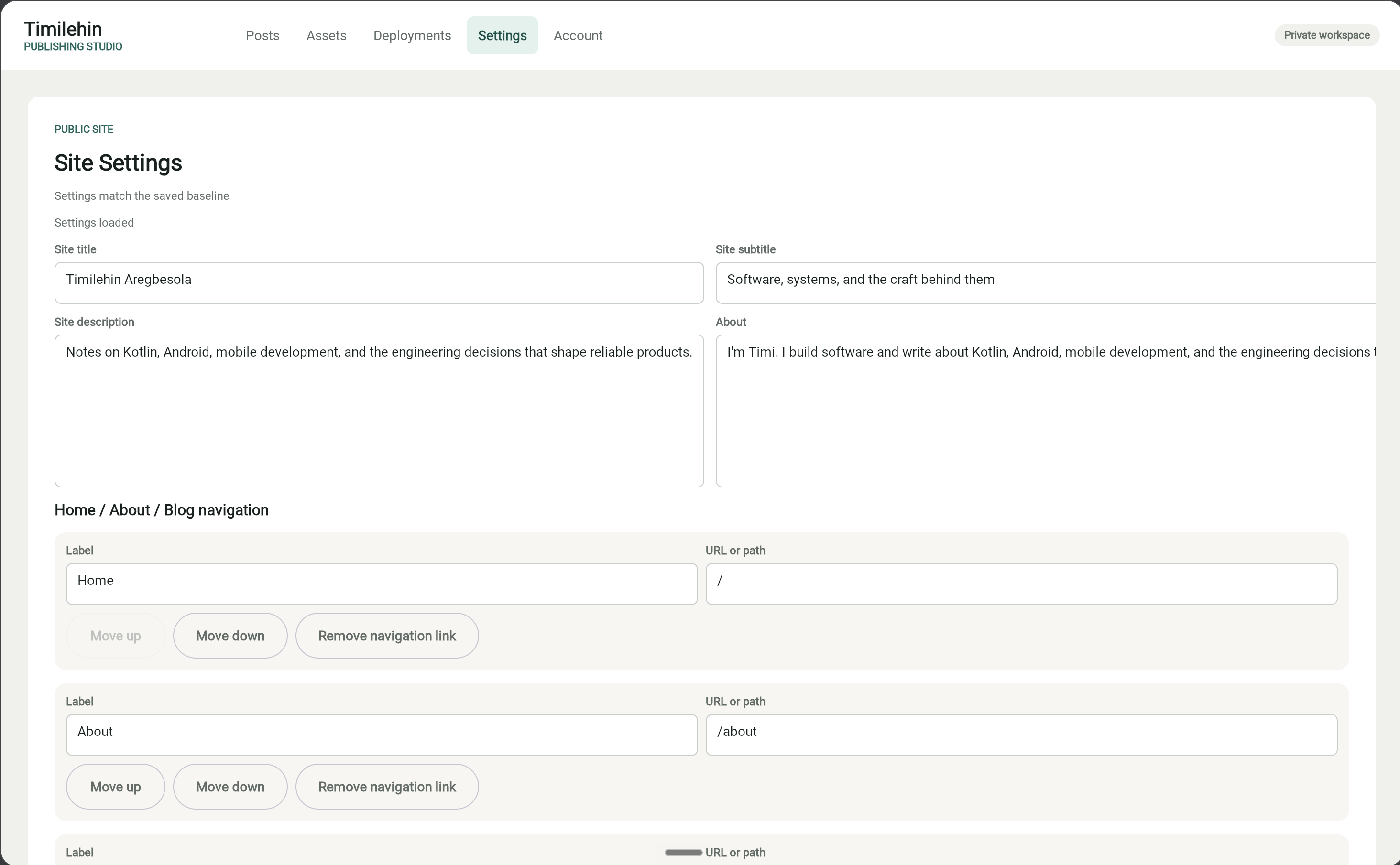 Image unavailable: Studio
Building a form-heavy browser application with Compose/Wasm was one of the more experimental parts of the project. Compose provides a familiar state model and makes the larger pieces of the interface pleasant to build. It also makes it possible to keep editor state explicit and update it through immutable copies.
The browser does not really stop being a browser, even though the application is written in Kotlin. File selection, multipart uploads, and preview hosting still cross into browser APIs. Some of the most awkward code in the studio is for that Kotlin-to-browser boundary.
The Wasm build is also the heaviest part of the project. It uses more memory, takes longer to build than the public site, and produces a much larger application than I would ordinarily want to send to readers. For a private tool used by one person, that trade-off is acceptable. I get to explore Compose on the web, while the cost stays away from the public reading experience.
Making preview match production
Preview sounds like a small feature until it becomes something you rely on. The easy implementation would be to render Markdown directly inside the admin application. The problem is that this creates two renderers: one for preview and another for the public site. They can disagree about sanitisation, headings, images, tables or styling.
In this system, Ktor owns Markdown rendering and sanitisation. The studio sends the current draft to the backend, then displays the result through a packaged preview host that uses the public article component and its styles.
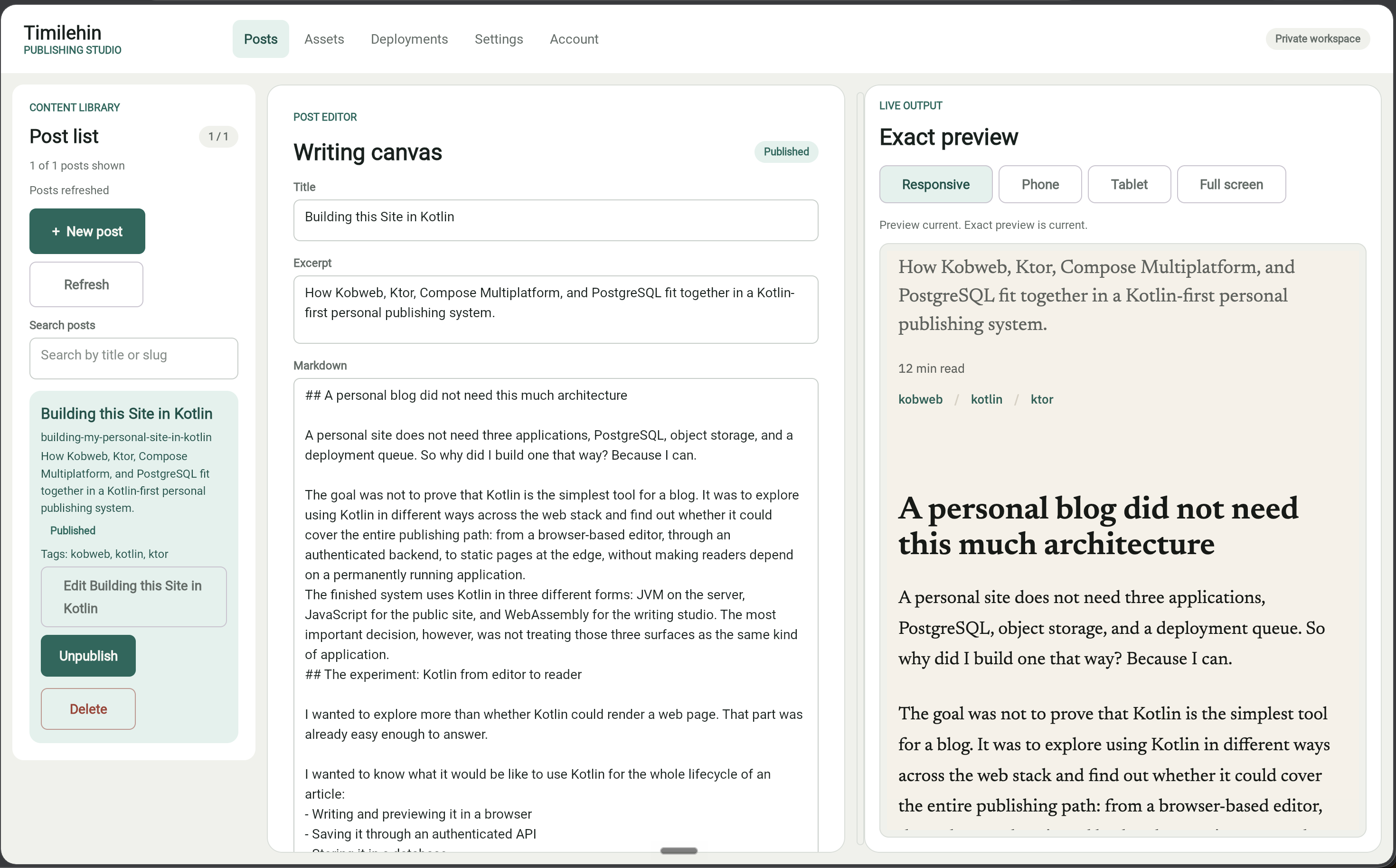 Image unavailable: Full preview by the side
That means preview is not merely an approximation of the content. It uses the same article structure and visual system as the public output. There is a cost to this arrangement. The public preview host must be packaged before the admin application is built, creating an explicit build-order dependency between the two projects. It is more complicated than dropping rendered HTML into a box. I still prefer it. A preview is only useful when I can trust what it is showing me.
Why editing and deployment became separate operations
One of the more important changes came from thinking about what the word “published” actually meant. Updating a row in PostgreSQL does not make a static article live. It only changes the source content. The site still has to be built, checked, and deployed. Saving, publishing, deleting, or unpublishing content therefore updates the CMS without automatically deploying the public site. When I am ready to release the latest saved changes, I use the studio’s Deploy site action. The backend records a deployment and immediately sends a signed repository event to GitHub Actions.
From there, GitHub Actions marks the deployment as running, fetches the latest complete snapshot, builds and checks the site, and deploys it to Cloudflare Pages. Once it finishes, it calls the backend again to record whether the deployment succeeded or failed.
The studio shows the deployment moving through queued, running, succeeded, or failed states instead of pretending that saving a post completed the entire process. A failed deployment keeps a useful error summary and can be retried as a new deployment linked to the original. Separating the two operations also means a failed deployment does not undo a successful content change. I can continue editing and deploy the complete snapshot when I am ready.
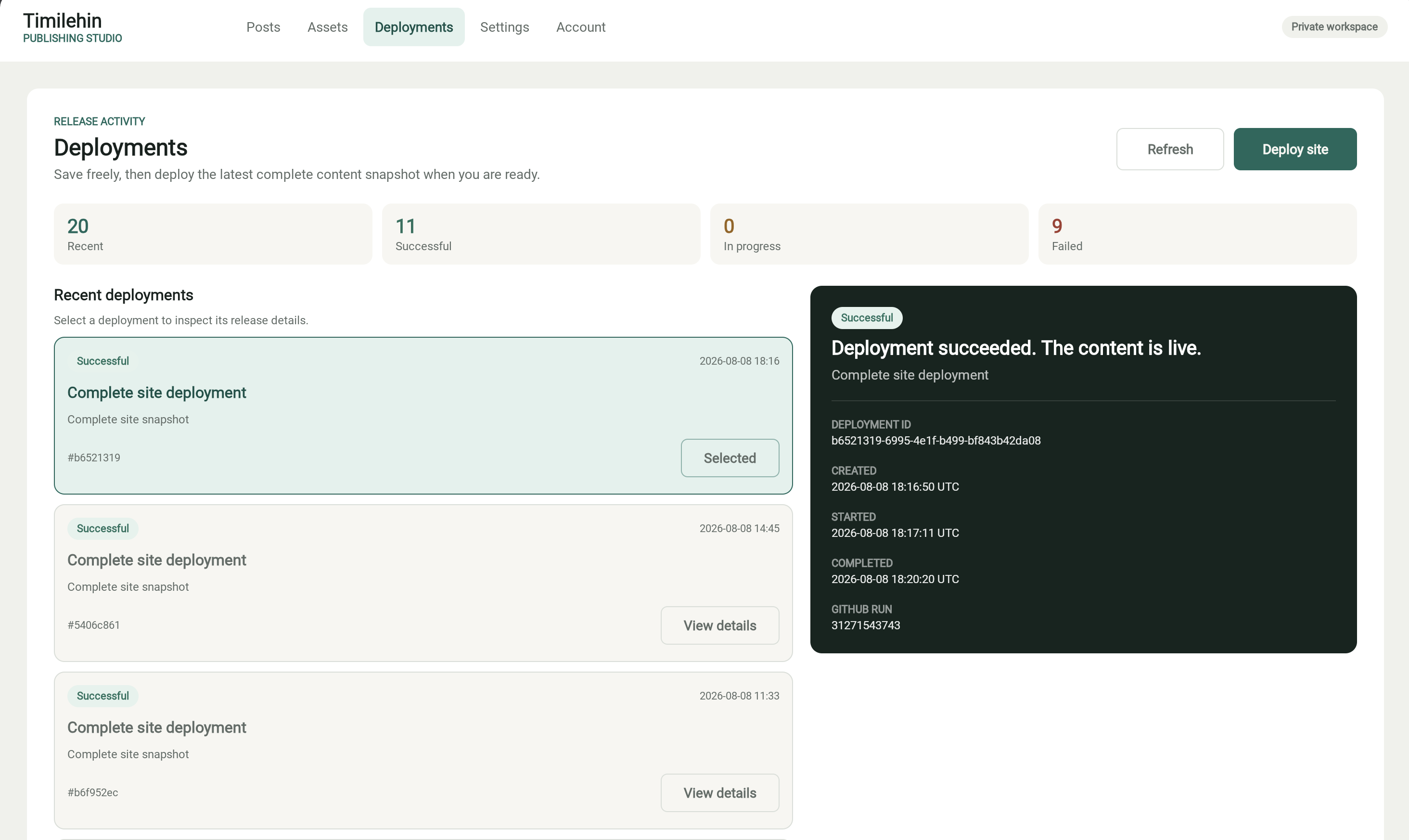 Image unavailable: Deployment page
The less interesting parts of putting it online
Because the studio is private, I needed a proper login flow. I use email magic links restricted to my address. The tokens expire quickly, can only be used once, and are stored as hashes. A successful login creates a secure cookie-based session. Uploads are also treated as untrusted input. The backend checks the actual image format and dimensions rather than trusting the filename or declared content type. Local development stores media on the filesystem, while production uses Cloudflare R2.
The publishing flow crosses a few different services, so the events sent to GitHub and the callbacks sent to Ktor are signed. That lets both sides check where a request came from, while the credentials themselves stay outside the repository. I also added separate checks to verify that the backend process is alive and can actually reach the database. Migrations run as part of deployment, and I wrote down how to recover from failed publishes, roll back a bad deployment, and restore the database if needed.
None of this is the exciting part of deciding to build a site in Kotlin. It is the work that turned the project from something that ran on my laptop into something I was comfortable putting online.
Results
The finished project is less a blog application and more a small publishing system. I can sign in to the studio, write a draft, upload a cover image, assign tags, and preview the result using the public article layout. I can save and publish a post without triggering a deployment, then explicitly deploy the latest complete snapshot, follow it through the pipeline, and see whether it reached production.
The public build generates complete pages for the entire site. Once deployed, those pages remain available independently of the CMS and database. Most importantly, the project answered the question I started with. Kotlin can cover the full publishing path across the JVM, JavaScript, and WebAssembly. I already knew this going in, but the bigger question was how practical it is. The answer is more than I thought going in. The parts fit together best when they share contracts and ideas, not when they are forced to use the same runtime or application model.
What I would keep and what I might change
I would keep the static boundary around the public site. Separating the reading experience from backend availability is useful beyond this particular Kotlin experiment. I would also keep the versioned snapshot. It gives the public build one clear input and provides a good place to validate content before deployment. I would keep the exact preview and visible deployment states too. The preview shows how the content will appear, while the deployment status indicates whether the latest snapshot actually made it to the live site.
Using Kotlin across the system was also worthwhile. Having shared models is useful; moving between projects feels familiar; and the differences between the three targets gave me exactly the kind of exploration I was looking for. I would think harder though, before building another CMS entirely from scratch. Authentication, upload handling, publishing recovery, and operational work add up quickly. If the goal were to launch a blog, I would use an existing system.
I might also choose a lighter approach for a form-heavy private interface if exploration were not among the goals. Compose/Wasm was interesting and generally pleasant to work with, but it brings a heavier build and more browser interop than a conventional web UI. The same applies to the project as a whole. Three applications, a database, object storage, and a custom deployment pipeline are difficult to justify for a personal blog on practicality alone.
But practicality was not the only goal. I wanted to explore how Kotlin behaves across the modern web stack, and I wanted the result to be a real system I could continue using. For that, I think the architecture did its job.